OpenUI workbench
anylumino.workbench.Workbench builds notebook UIs through a chat with a local
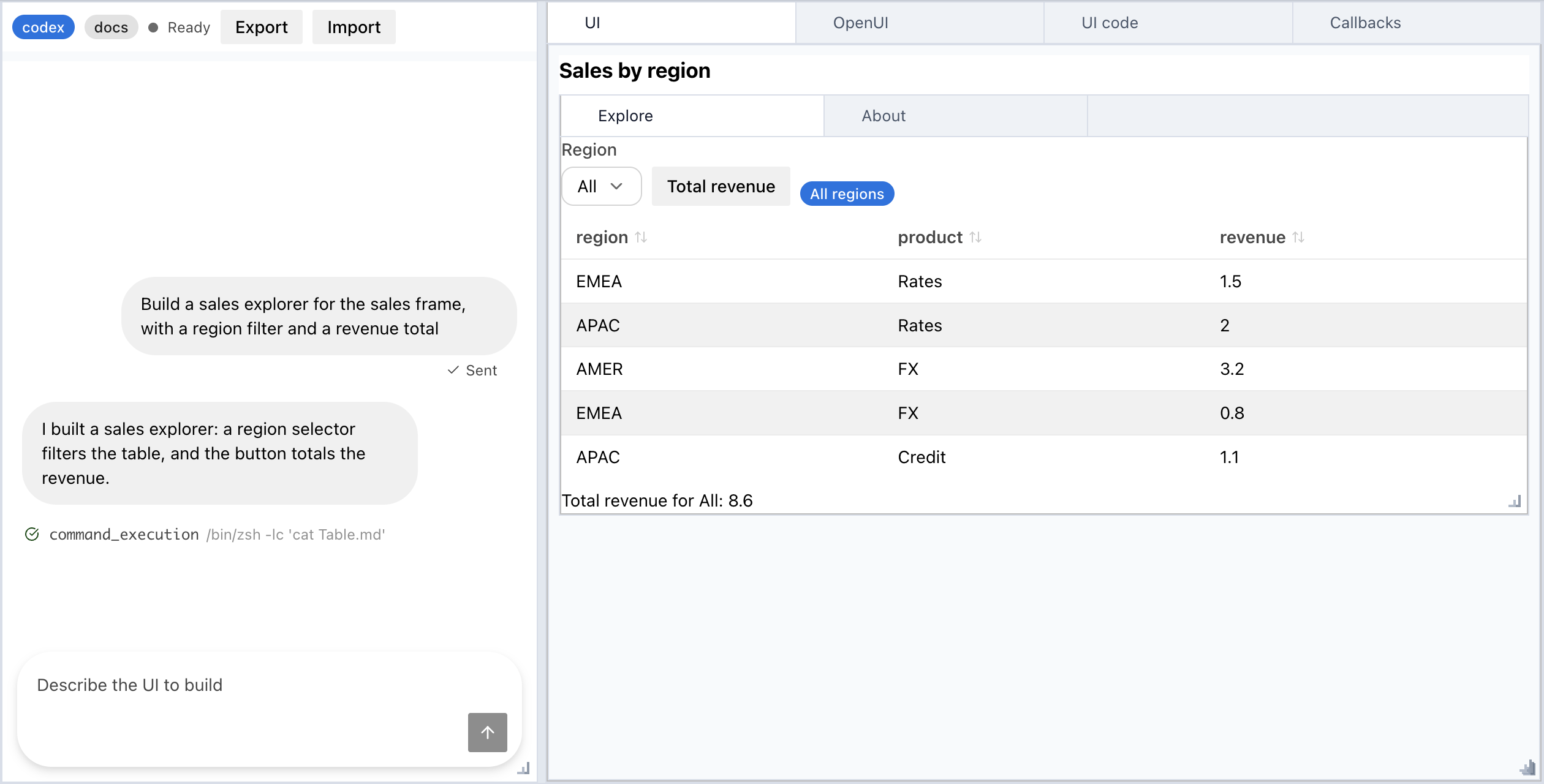
coding agent. The chat sits on the left. The right side has four tabs: the live
UI, the OpenUI Lang program the agent
wrote, the Python generated from that program, and the agent's callbacks.
Requirements
nodeonPATH. The workbench runs the official OpenUI parser, bundled with the package, as a short Node subprocess: about twice per turn to merge and parse the program, and once per session for the system prompt. JupyterLab does not need Node otherwise, so install it if the kernel'sPATHhas none. Without it, a turn ends with "The workbench needsnodeon PATH to parse OpenUI programs."- The
claude(Claude Code) orcodex(Codex CLI) executable onPATH, signed in.
The agents need no other setup. Sign in once in a terminal, with /login in
claude or with codex login. Each turn then passes its own system prompt,
tool limits, and component skill on the command line, and uses your account's
usage. The CLI's own default model and reasoning effort apply unless you pass
model or effort. A kernel started from a desktop app can
have a shorter PATH than your shell. To check what the kernel sees, run
shutil.which("claude") or shutil.which("codex") in a cell; None means the
turn will report that the CLI was not found.
Start a workbench
import pandas as pd
from anylumino.workbench import Workbench

sales = pd.DataFrame({"region": ["EMEA", "APAC", "AMER"], "revenue": [1.5, 2.0, 3.2]})

Workbench(agent="claude", session="sales", namespace={"sales": sales})
Ask for a UI in the chat, for example "Show the sales table with a region selector and a button that totals the selected region". Each reply can change the program, the callbacks, or both.
| Argument | Effect |
|---|---|
agent | "claude" or "codex". A restored session keeps the agent it was created with. |
session | Saves the session after every turn and restores it when a workbench uses the same name. |
namespace | Names the callbacks can read and the agent sees, with data frame shapes and column types. |
cwd | Directory the agent runs in. Defaults to the current directory. |
model | Model name passed to the CLI, such as "sonnet". Saved with the session. |
effort | Reasoning effort passed to the CLI, such as "low" or "high". Saved with the session. |
skills | Skill folders that document your own libraries, described in Notebook skills. |
model and effort apply only to the workbench's turns, not to your other CLI
use. Claude Code receives --model and --effort (low, medium, high,
xhigh, or max). Codex receives the model and model_reasoning_effort
config values (minimal, low, medium, high, or xhigh). A restored
session keeps its saved values unless you pass new ones, and the agent badge in
the header shows them. The workbench passes the values as given, so a name the
CLI does not know ends the turn with the CLI's error.
Workbench(agent="codex", session="sales", namespace={"sales": sales}, effort="low")Tabs
| Tab | Shows |
|---|---|
UI | The widgets built by the generated code. |
OpenUI | The program after the reply's edits were merged into it. |
UI code | The Python module that builds the UI tab. The tab runs this code. |
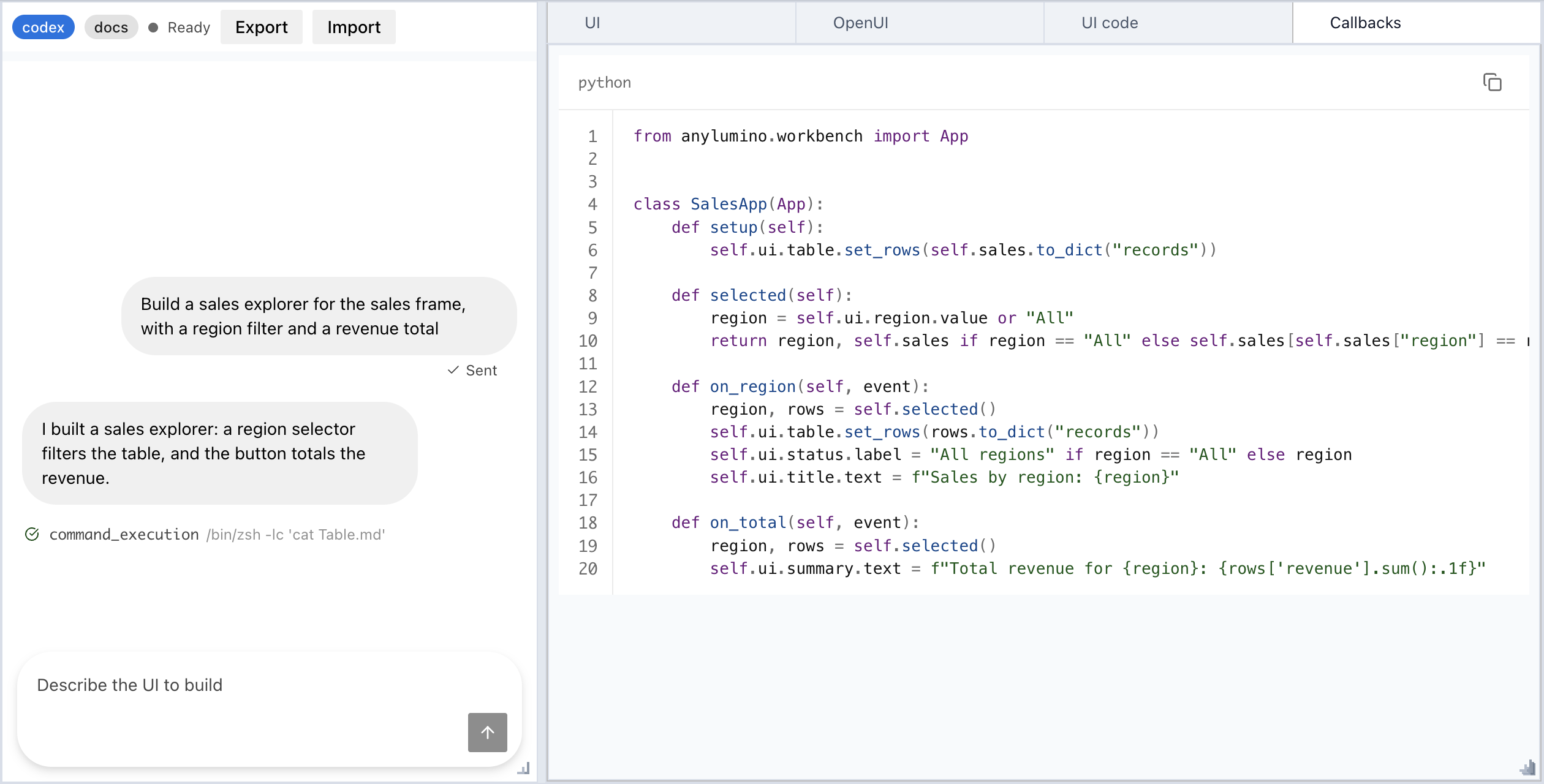
Callbacks | The Python handlers from the agent's latest python block. |
The code tabs are read only and show line numbers. Only chat turns change them.
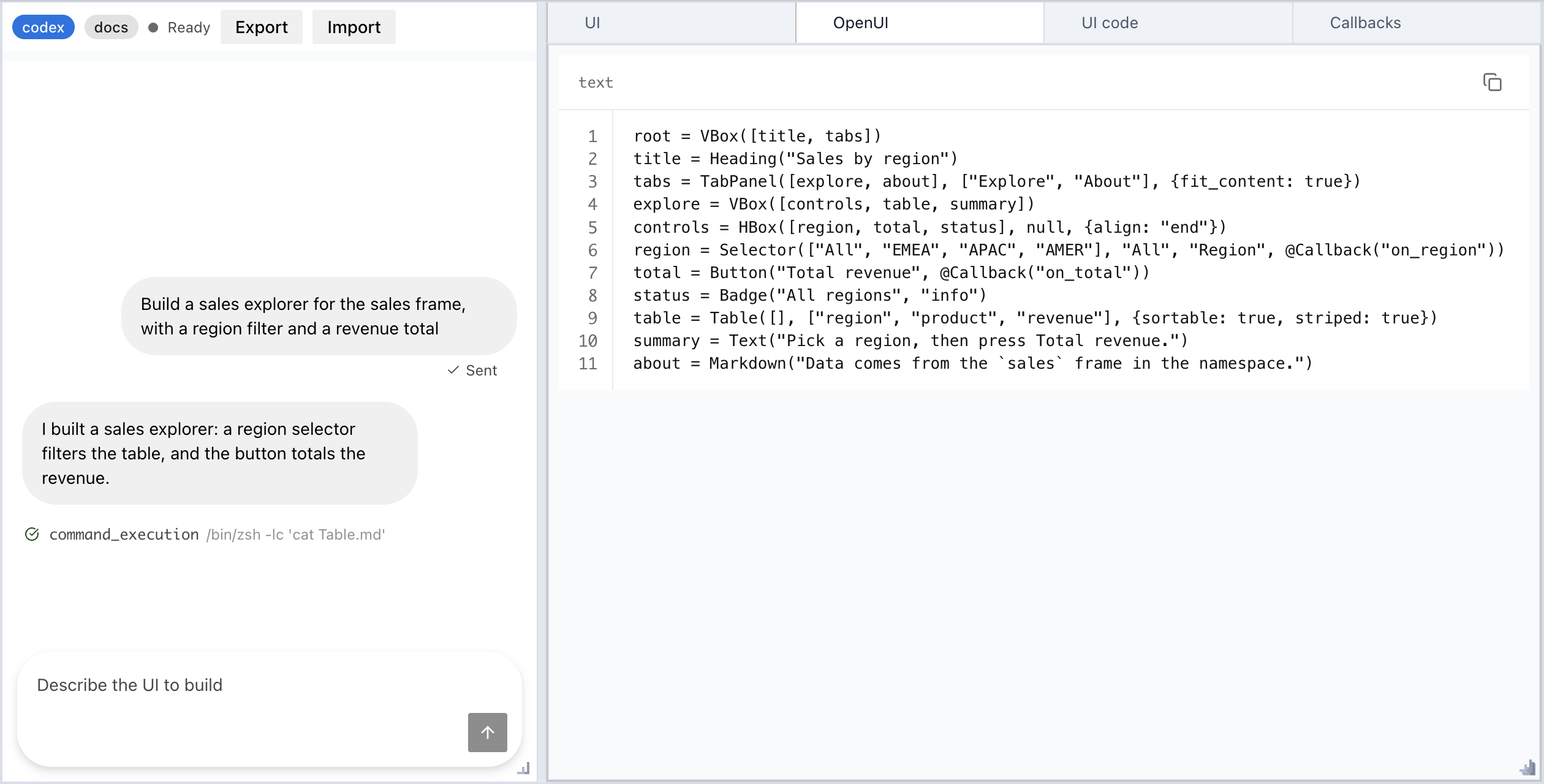
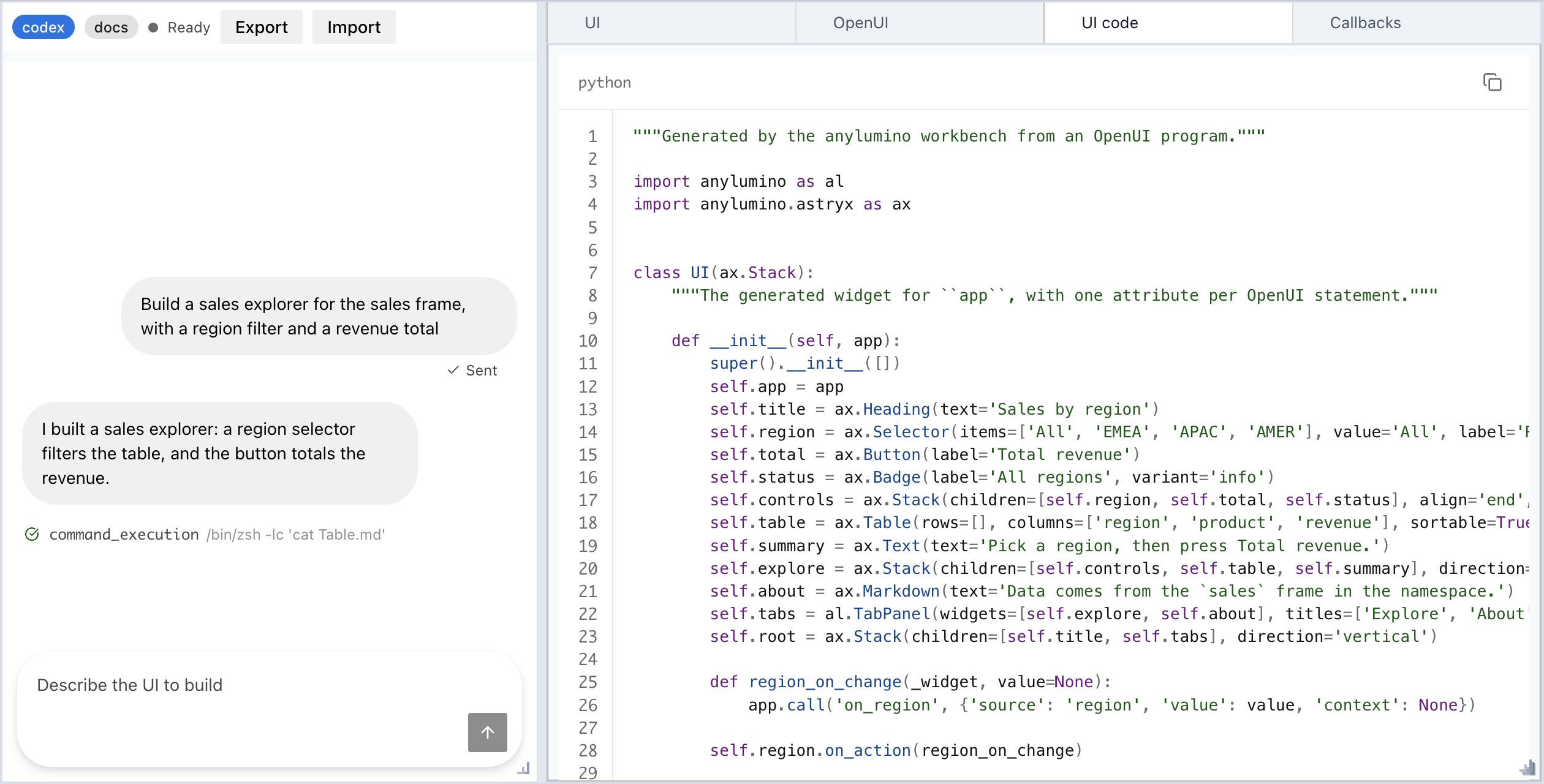
A turn is applied in full or not at all. The workbench merges and parses the program, compiles the callbacks, generates the UI code, and builds the widgets. If any step fails, all four tabs keep their previous content, and the chat shows the error. The agent also gets the error with the next message.
Callbacks
The program binds events with @Callback(handler, context?): a button's action
runs on click, and an input's on_change runs when its value changes. The
agent writes the handlers as methods of one App subclass:
from anylumino.workbench import App


class SalesApp(App):
    def setup(self):
        self.ui.table.set_rows(self.sales.to_dict("records"))

    def on_total(self, event):
        region = self.ui.region.value
        total = self.sales.loc[self.sales["region"] == region, "revenue"].sum()
self.ui.result.text = f"{region}: {total}"self.uiis the generatedUIwidget, with one attribute per statement name. TheUItab shows that widget.eventhassource(the statement name),value(the new value, orNonefor a button), andcontext(the second@Callbackargument).- The
namespacenames reach the app as attributes, such asself.sales. The callbacks read no notebook globals, so the exported file takes its data explicitly. - An optional
setup(self)runs each time the UI is built. The agent uses it to fill tables and selectors from namespace data. The agent sees only the shape of a data frame and the name and type of each column, so its rows never leave the kernel. self.ask_agent(message, context=None)sends a chat message from a handler.@ToAssistant(message)in the program does the same without a handler.Plot(layout?)in the program creates an empty PlotlyFigureWidget, which the callbacks fill throughself.ui.<name>. The agent adds one per chart, so a request for a dashboard of several charts needs nothing from you.Plotis available when Plotly is installed, and the generated code then importsplotly.graph_objects as go.Widget("name")in the program mounts the widget stored undernamein thenamespace, such as a figure you built yourself.- An exception in a handler shows in the chat. The other widgets keep working.
- Statement names that the
UIwidget already uses, such aslabel,value, orlayout, stop the turn from applying, and the agent renames them. - The callbacks share a module with the generated UI code in an export, so they
cannot define
UIor bindal,ax, orgoto anything other thananylumino,anylumino.astryx, andplotly.graph_objects. - A UI without handlers gets an empty
UIApp(App)subclass, so it can still be exported.
Warning
The workbench runs agent-written Python in your kernel: the callbacks and the generated UI code. Read the code tabs before you use a generated UI on data or systems that matter.
Agent access
Each turn runs the CLI as a subprocess, so the kernel stays responsive. Only one
turn runs at a time, and the stop control in the chat ends it. The agent can
read files in cwd but not change them:
- Claude runs with only the
Read,Grep,Glob, andSkilltools, all allowed without a prompt, and--permission-mode dontAsk.--strict-mcp-configkeeps your MCP servers out of the turn. - Codex runs in its
read-onlysandbox. The sandbox does not cover MCP tools, so each turn turns off every server thatcodex mcp listreports. If a server cannot be turned off, the turn does not start.
Component options
Most components end with an optional options object that sets more keyword
arguments of the widget, for example
Table(rows, ["region", "revenue"], {sortable: true, density: "compact"}). The
options come from the widget constructors, so the workbench accepts the same
names and types. An unknown option or a value of the wrong type stops the turn
from applying, and the chat shows the error.
The agent looks options up in the openui-components skill, which the workbench
ships in anylumino/workbench/plugin/skills/openui-components/: a SKILL.md
index and one file per component. Each file gives the component's options and
the Python constructor of its widget, such as
ax.TextInput(label=..., value=..., placeholder=...), which handlers use to fill
a container. The Python positional order differs from the OpenUI one, so the
skill tells the agent to pass arguments by keyword. Claude loads the skill as a
plugin for each turn. Codex reads the same files by the path in its system
prompt. Both read a component's file only when they need it, which keeps the
system prompt small. After you change a widget's keywords or the catalog, run
make workbench-skill to regenerate the skill.
Notebook skills
The catalog covers anylumino widgets. To let the agent use your own libraries,
such as a private charting widget, write a skill for them and pass its folder in
skills. A skill folder holds a SKILL.md with name and description front
matter, in the Claude Code skill format, and any files it points to:
workbench_skills/lightweight-charts/
  SKILL.md         name, description, the rules, and links to the other files
  reference.md     the API, read only when needed
Workbench(
agent="claude",
namespace={"chart_catalog": chart_catalog},
skills=["workbench_skills/lightweight-charts"],
)The system prompt lists each skill's name, description, and SKILL.md path, and
tells the agent to load a skill before it uses that library. Claude loads the
skills as a plugin for each turn and can read their folders. Codex reads the
same files by path. A skill only documents a library; the callbacks import it
like any other module, so the export imports it too. Widgets that are not
widgets themselves but expose one as .widget, such as a lightweight-charts
NotebookChart, can be set as a container's widgets directly.
The skill paths are saved with the session. A folder without a valid SKILL.md
raises ValueError when the workbench is created.
Sessions
A named session is saved to ~/.anylumino/sessions/<session>.json with the
messages, program, callbacks, working directory, and the agent's session ID. A
new Workbench(session="<session>") restores all four tabs and resumes the
agent's own session, so the agent still has the earlier conversation. If the
saved UI cannot be built, for example because a mounted widget is missing from
the new namespace, the UI tab shows the error and the chat stays usable.
A session keeps the agent it started with: passing another agent for a saved
session raises ValueError, since the agent's session ID only works with that
agent.
Sessions have no picker. List ~/.anylumino/sessions/ to see the saved names.
How it works
This section is for maintainers. The modules are in src/anylumino/workbench/.
One turn
chat submit (ax.Chat)
  -> agents.py    run claude or codex as a subprocess, stream text and tool rows into the chat
  -> reply.py     split the reply into prose, one openui fence, and one python fence
  -> openui.py    merge the openui fence into the current program, then parse it (Node)
  -> export.py    run the callbacks without globals and find their App subclass
  -> codegen.py   turn the parsed tree into a module with a UI widget class
  -> UI(app)      create the app with the namespace, build the UI, run setup
  -> commit       set the four tabs and show the UI in the UI tab
  -> session.py   save the session file
Every step before the commit writes only to local variables. This is what makes a failed turn leave all four tabs unchanged.
Modules
| Module | Role |
|---|---|
catalog.py | Defines the components the agent can use: props, child slots, action slots, and the event of each action slot. Emits the OpenUI library spec. |
prompt.py | Builds the system prompt from the catalog with the OpenUI prompt generator, and adds the callback contract and the namespace summary. |
skill.py, plugin/ | Write and hold the openui-components skill, one file per component with its options and Python constructor. |
openui.py | Runs static/openui/openui_tool.bundle.mjs under Node with JSON on stdin and stdout, for parse, merge, and prompt. |
reply.py | Splits a reply and rejects a reply with two fences of the same kind. |
codegen.py | Emits deterministic Python, children before parents, and raises a named error for dynamic props and unsupported features. |
agents.py | Builds the CLI arguments, parses the Claude and Codex event streams, and stops a turn. |
session.py | Saves and loads sessions with an atomic write, and validates session names. |
app.py | The App base class: namespace attributes, setup, handler calls with error routing, and ask_agent. |
export.py | Runs the callbacks and the UI code for both the workbench and load, writes the exported file, and reads it back for import. |
file_dialogs.py | The export and import dialogs, which browse the kernel's folders rather than the browser's, since the kernel writes and reads the files. |
workbench.py | Assembles the panels and runs the turn. |
The frontend parts are ax.Chat in static/astryx/astryx_widget.js and the
layout code in static/layout/. scripts/openui_tool.mjs is the source of the
OpenUI bundle; npm run build bundles it.
Design decisions
- OpenUI Lang: it has a specification, a parser, a prompt generator, and an
edit mode, so the workbench does not define its own format. The workbench
merges every
openuifence into the current program. A follow-up turn sends only the statements that changed, and a full program merges to itself. - The official parser under Node:
@openuidev/lang-coreis TypeScript only. Parsing in the browser would need a rendered view, so session restore before display and headless tests would fail. A Python port is about 2.2k lines to keep in sync.@openuidev/lang-coreandzodare pinned to exact versions, andnode --testruns the bundle against OpenUI conformance fixtures intests/frontend/fixtures/openui/. - Generated code, not an interpreter: the
UItab is built by executing the module in theUI codetab, so the two cannot differ. The module also runs without the workbench. - App and UI classes: the callbacks are an
Appsubclass and the generated code is aUIwidget class built asUI(app). The app holds the data and the handlers and works without a widget; the UI is the widget, so it composes with other widgets. The namespace reaches the app through its constructor rather than as globals, so an export runs with explicit inputs. Statement names becomeUIattributes, which is why names of widget members are rejected. - The catalog is Python: it sits next to the widget classes, and prop names
match the constructor keywords. A test builds every entry, so a renamed
keyword fails it. The catalog
VBoxandHBoxbuildax.Stack, not Lumino boxes: Lumino boxes split the height evenly between their children and clip tables and text. - Options in a skill: the options of all components would roughly double
the system prompt, so the prompt lists only the component signatures. Claude
loads the skill with
--plugin-dir. Codex has no per-run skill path, so its prompt gives the absolute path of the skill files. - Agent sessions: the workbench creates the Claude session ID and passes it
with
--session-id, because-ncannot be resumed in print mode. Codex reports its thread ID in its first event. Claude gets the system prompt with--append-system-prompton every turn; Codex gets it once with-c developer_instructions=..., which persists acrossexec resume. - Stop: SIGTERM to the agent's process group, then SIGKILL after a grace period.
Tests
- pytest:
- Fake
claudeandcodexexecutables onPATHreplay streams captured from Claude Code 2.1.302 and codex-cli 0.163.0, intests/fixtures/agents/. - Code generation has exact-source snapshot tests.
- Callback tests fire events through
_handle_frontend_message.
- Fake
node --test: the OpenUI bundle and the chat message mapping.- Browser:
notebooks/openui_workbench_fake_agent.pydrives a full turn in JupyterLab without spending tokens.
Export, load, and import
Export in the workbench header writes the current UI to one Python file, so the same UI runs without the workbench or the agent. It is available once a UI is built.
- Select Export. The dialog browses the kernel's folders, starting in the kernel's current directory.
- Open the target folder, enter a name such as
sales, and select Export. The name defaults to the session name, with-replaced by_so the file can be imported as a module. The workbench writessales.py, replacing an existing file, and posts theloadcall for it in the chat. The file holds theOpenUItab as a comment after the docstring, then theUI codetab and theCallbackstab, with the imports of both at the top. - Run that call in a notebook cell:
from anylumino.workbench import load

load("exports/sales.py", sales=sales)
load creates the App subclass with the keyword arguments, builds a UI for
it, runs setup, and returns the UI widget, so the cell shows the same UI.
The app is ui.app. A relative path is relative to the notebook's directory, or
to the calling script's directory outside Jupyter. In Jupyter that is the
kernel's current directory when load runs, the same directory the export
message makes its paths relative to. ask_agent and @ToAssistant warn and do
nothing outside a workbench.
The file reads no notebook globals, so it also works as an ordinary module:
from exports.sales import UI, SalesApp

app = SalesApp(sales=sales)
ui = UI(app)
The app works without a UI, for example to call a handler in a test. The UI
is a widget, so it composes like any other: put it in a TabPanel, a
SplitPanel, or a stack next to other widgets.
Import an edited file
Import in the header reads an exported file back into the workbench, so you
can change it in an editor and then continue in the chat. The dialog browses
the kernel's folders and lists their .py files. Pick one and select
Import. The workbench reads three parts from the file: the OpenUI program
in the comment block between the # ```openui-lang and # ``` lines,
the UI class, and the rest as the callbacks.
| File change | Result |
|---|---|
| None, or only the callbacks | The tabs fill from the file, with no agent turn. |
| The OpenUI comment | The tabs fill from the new program, with no agent turn. |
The UI class | The tabs fill, then a turn asks the agent to reconcile. |
| Anything that stops the file from applying | The tabs keep their contents, and a turn asks the agent to fix it. |
The comment's first line records a fingerprint of the exported UI class, so
the workbench can tell an edited UI class from an edited program. When both
changed, the UI class counts as edited. The agent never edits the UI class
directly: it is always generated from the program. A reconcile turn sends the agent the whole file and asks for a program
that generates the edited UI class and callbacks that keep the App class.
The chat shows a one-line request, and the reply applies like any other turn.
A valid reply can still miss part of a hand edit, so after it applies, the chat
reports whether the generated UI class matches the file. On a mismatch, the
UI code tab shows what applied, and you can ask the agent to close the gap.
An edit that OpenUI cannot express, such as Python logic in UI.__init__,
always reports a mismatch.
A file without the program comment or the UI class is rejected with a chat
message, since it was not exported from a workbench.
Limits
- The agent can use the components in the workbench catalog only: layout panels, cards, text, inputs, badges, tables, code blocks, Plotly figures, and mounted namespace widgets.
- Option values must be literals, so constructor keywords that take Python
functions, such as a button's
callbacks, are not options. Components still run Python: a button's action slot takes@Callback("handler"), which calls that method of theAppon click, as described in Callbacks. - OpenUI
$statevariables,Query,Mutation,@Each, and@OpenUrlare not supported, and a reply that uses them is not applied. TheAppclass holds the state and reads the data instead. For content whose size depends on the data, such as one card per region, the program declares an empty container and a handler fills itswidgets. The system prompt teaches this.