Overview
Composable notebook widgets built on anywidget, Lumino, and Astryx.
anylumino is a Python library for building composable notebook widgets with
anywidget. It provides Lumino layout panels, menus, and toolbars, a family of
Astryx UI components for inputs, tables, and surfaces, and browser-native date
and time controls, all exposed as anywidgets that nest into one another.
The package gives notebooks an app-like layout vocabulary: tabs, split panes, dock panels, scrollable control stacks, tables, forms, command palettes, and keyed child access from Python.

The core idea is direct composition:
import anylumino as al
import anylumino.astryx as ax

brand = ax.Brand(
    "desk",
    **{
        "color-accent": ("#0057b8", "#79b8ff"),
        "color-background-card": ("#ffffff", "#111827"),
        "radius-container": "8px",
    },
)

orders = ax.Table(
    rows=order_rows,
    columns={"order_id": "Order", "symbol": "Symbol", "qty": "Qty", "status": "Status"},
    row_key="order_id",
    selects="multiple",
    sortable=True,
)

controls = ax.Theme(
    {
        "symbol": ax.Typeahead(
            ["AAPL", "MSFT", "NVDA"],
            value="AAPL",
            label="Symbol",
        ),
        "fields": ax.Tokenizer(
            ["Bid", "Ask", "Last"],
            value=["Bid", "Ask"],
            label="Fields",
        ),
        "refresh": ax.Button("Refresh", variant="primary"),
    },
    brand=brand,
    gap=3,
)

tabs = al.TabPanel({"orders": orders, "chart": trend_figure})
al.SplitPanel({"controls": controls, "workspace": tabs}, sizes=[0.25, 0.75])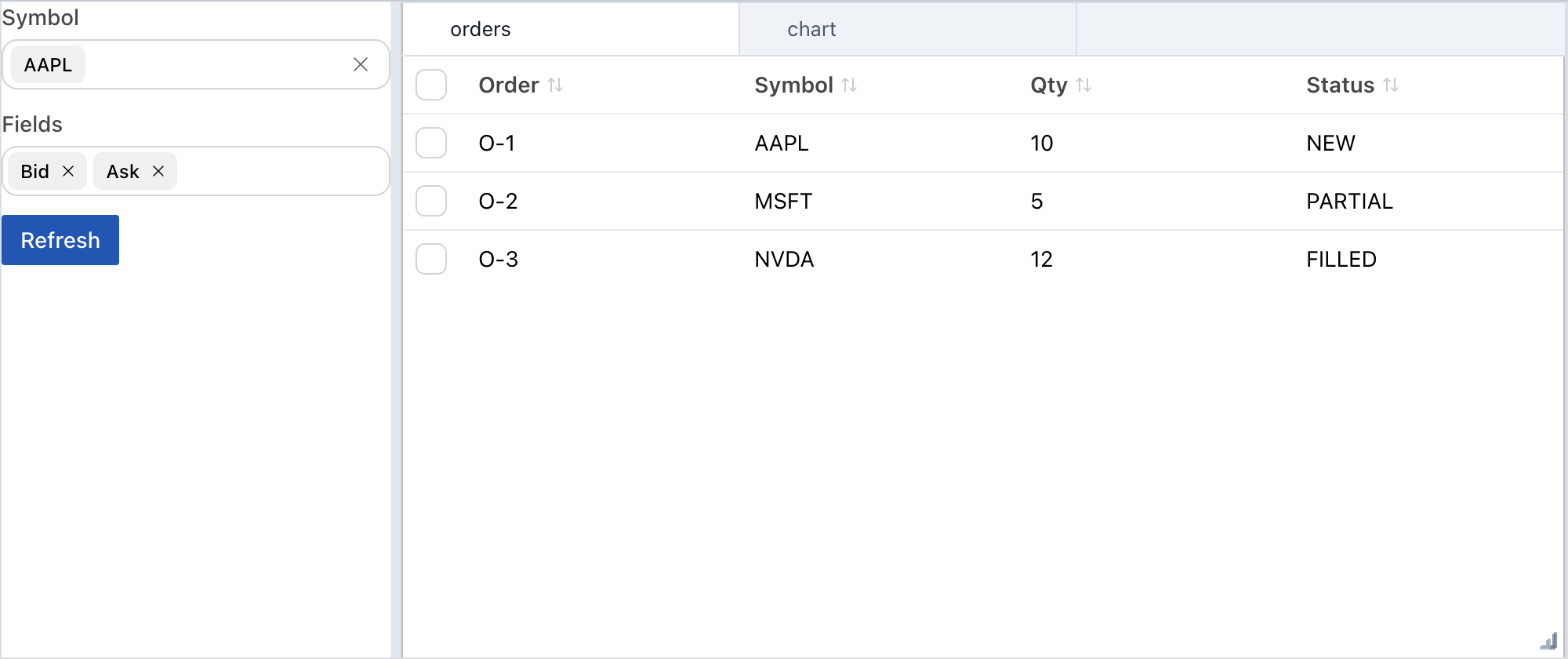
The benefit is not only visual layout. An anywidget layout library gives a notebook the same composition model used in application UI code: build larger reusable widgets from smaller widgets, keep children addressable by key, attach callbacks to controls, and place behavior on the composed object itself.
For example, a FigurePanel can combine a toolbar and a figure, expose methods
such as refresh() or set_data(), and still be nested inside a TabPanel or
SplitPanel like any other widget. That keeps state and behavior close to the
UI component instead of spreading them across notebook-global variables.
What it provides
Layouts
TabPanelfor tabbed child widgets.BoxPanel,HBox,VBox, andScrollBoxfor linear composition.SplitPanelfor drag-adjustable panes.DockPanel,AccordionPanel,StackedPanel,GridPanel, andResponsivePanelfor application-like notebook layouts.
Actions
Toolbarfor compact command rows.MenuBarfor grouped commands.CommandPalettefor Lumino-style searchable actions, with an inline notebook-safe Astryx variant inanylumino.astryx.
Each action can dispatch to a Python callback.
Controls
anylumino includes Astryx wrappers for buttons, text inputs, selectors,
tokenizers, segmented controls, tables, status surfaces, popovers, inline
dialogs, and reusable brand themes.
Design model
anylumino is designed around LayoutWidget, the shared base class for layout
containers. A layout can be declared with a dictionary, and those keys become
the stable access path from Python:
tabs = TabPanel({"trend": trend_panel, "samples": samples_table})
tabs.select_key("samples")
tabs["trend"].refresh()
tabs.call_owner("trend", "refresh")
That lets a dashboard own layout, state, and behavior without relying on global variables.
Next steps
- Read the composition guide for child mapping, mutation, resizing, and callbacks.
- Review Astryx controls for notebook UI components, forms, tables, and themes.
- Explore the examples for notebook dashboard patterns.
- Open the API reference generated from the package docstrings.